

Upload and stream tutorial#
Upload a race car’s recorded telemetry to a vehicle asset, stream live data to the same asset, and watch it arrive in a workbook. It uses two complete scripts, run from the terminal.
You need the installed client and a profile. The scripts take the profile name with --profile.
Upload a CSV to an asset#
Download the sample data. Nominal ingests the gzipped CSV as it is:
Save this script as
fsae_asset_upload.py. It finds or creates theFSAE CT8 Vehicleasset, uploads the CSV to its dataset and sets the channels’ units:"""Create an asset and upload a CSV dataset to it. Creates (or reuses) an FSAE vehicle asset, uploads the racecar CSV from the [upload and stream tutorial](/guides/longstart.md) as its dataset, and tags each channel with its unit. Run it with `python fsae_asset_upload.py --file racecar_dataset.csv.gz --profile <profile>`. """ import logging import sys import uuid from collections.abc import Mapping, Sequence import click from nominal.cli.util.global_decorators import client_options, global_options from nominal.core import Asset, NominalClient logger = logging.getLogger(__name__) def get_or_create_asset_or_guide_cleanup( client: NominalClient, properties: Mapping[str, str], *, name: str, description: str | None = None, labels: Sequence[str] = (), ) -> Asset: """Look up an asset by properties, creating one if none exists. Asset properties should uniquely identify the physical thing the asset represents. If multiple assets share these properties (for example, someone manually created a duplicate), log a red clean-up guide via the CLI's ClickLogHandler and exit. """ try: return client.get_or_create_asset_by_properties(properties, name=name, description=description, labels=labels) except ValueError: conflicts = client.search_assets(properties=properties) conflict_lines = "\n".join(f" - {a.name!r}: {a.nominal_url}" for a in conflicts) logger.error( f"Multiple assets in this workspace share properties {dict(properties)!r}:\n" f"{conflict_lines}\n" "\n" "Asset properties are key-value tags on an asset (for example, serial_num\n" "or car_number). They should uniquely identify the physical thing an asset\n" "represents, so a property search returns exactly one asset. Duplicates\n" "here mean an earlier tutorial session or another user already created an asset with\n" "these properties.\n" "\n" "Open each URL above, archive the ones you do not want to keep, then\n" "re-run this script. You can also archive from Python:\n" "\n" " client.get_asset('<rid>').archive()" ) sys.exit(1) @click.command() @click.option( "-f", "--file", "filepath", required=True, type=click.Path(exists=True, dir_okay=False), help="Path to the racecar_dataset.csv.gz file you downloaded.", ) @client_options @global_options def main(filepath: str, client: NominalClient) -> None: """Create an FSAE asset in Nominal and upload a CSV dataset to it.""" # Attach our own ingest tag to every point so the upload is easy to find # if others share the workspace. Nominal also attaches _nominal_ingest_rid # automatically, but it is surfaced only in the UI. session_id = str(uuid.uuid4()) click.secho( f"\nTutorial session ID: {session_id}\n" f"Filter by tag 'tutorial_session_id' = '{session_id}' in Nominal\n" f"to isolate this upload.\n", fg="green", bold=True, ) my_asset = get_or_create_asset_or_guide_cleanup( client, properties={"team": "Example Racing", "car_number": "8"}, name="FSAE CT8 Vehicle", description="Asset for FSAE single asset tutorial", labels=["FSAE", "Vehicle"], ) print("Using asset with RID: ", my_asset.rid) my_dataset = my_asset.get_or_create_dataset( # Data scope name (reference name) for this dataset within the asset. # This can be used later to retrieve this dataset by the same name. data_scope_name="Primary Data Source", # Human readable name shown in the Nominal UI. name="FSAE CT8 Vehicle dataset", # Optional long-form description shown on the dataset page. description="Dataset for FSAE single asset tutorial", ) print("Created dataset with RID: ", my_dataset.rid) dataset_file = my_dataset.add_tabular_data( filepath, timestamp_column="Timestamps", timestamp_type="iso_8601", tags={"tutorial_session_id": session_id}, ) dataset_file.poll_until_ingestion_completed() print("Added CSV data to dataset! All Systems Nominal") # Tag every CSV channel that carries a unit in its column name using # strict UCUM symbols so Nominal can do unit conversions. UCUM quirks: # - psi -> [psi] (bracketed special unit) # - mph -> [mi_i]/h (international mile per hour) # - g-force -> [g] (standard gravity; bare "g" is UCUM for grams) # - rpm -> /min (reciprocal minute; 1 rpm = 1/60 Hz) my_dataset.set_channel_units( { "Distance_km": "km", "RR_Shock_mm": "mm", "RL_Shock_mm": "mm", "FL_Shock_mm": "mm", "FR_Shock_mm": "mm", "FL_Shock_Pos_Zero_mm": "mm", "FR_Shock_Pos_Zero_mm": "mm", "RL_Shock_Pos_Zero_mm": "mm", "RR_Shock_Pos_Zero_mm": "mm", "FL_Shock_Speed_mm/s": "mm/s", "FR_Shock_Speed_mm/s": "mm/s", "RL_Shock_Speed_mm/s": "mm/s", "RR_Shock_Speed_mm/s": "mm/s", "FL_Shock_Accel_mm/s/s": "mm/s2", "GPS_Altitude_m": "m", "GPS_PosAccuracy_m": "m", "AIM_DistanceMeters_m": "m", "GPS_Elevation_cm": "cm", "GPS_Latitude_°": "deg", "GPS_Longitude_°": "deg", "GPS_Slope_deg": "deg", "GPS_Heading_deg": "deg", "Re_Roll_Gradient_Degree": "deg", "GPS_Gyro_deg/s": "deg/s", "Battery_V": "V", "F88_V BATT_V": "V", "F88_BARO_PR_mbar": "mbar", "Rear_Brake_psi": "[psi]", "Front_brake_psi": "[psi]", "F88_OIL_P1_psi": "[psi]", "F88_FUEL_PR1_psi": "[psi]", "Run_Oil_Pres_psi": "[psi]", "Run_Oil_Pres_Hi_psi": "[psi]", "Load_Oil_Pres_psi": "[psi]", "Load_Oil_Pres_Hi_psi": "[psi]", "Load_Oil_Pres_Hi2_psi": "[psi]", "F88_V_SPEED_mph": "[mi_i]/h", "F88_D_SPEED_mph": "[mi_i]/h", "F88_SPEED_FL_mph": "[mi_i]/h", "F88_SPEED_FR_mph": "[mi_i]/h", "F88_SPEED_RL_mph": "[mi_i]/h", "F88_SPEED_RR_mph": "[mi_i]/h", "GPS_Speed_mph": "[mi_i]/h", "Acc_Lateral_g": "[g]", "Acc_Longitudin_g": "[g]", "GPS_LatAcc_g": "[g]", "GPS_LonAcc_g": "[g]", "F88_RPM_rpm": "/min", "Fuel Used_Liters": "L", "Fuel Flow_cc/min": "cm3/min", }, allow_display_only_units=True, ) if __name__ == "__main__": main()
Run it:
python fsae_asset_upload.py --profile <PROFILE> --file racecar_dataset.csv.gzIn the Assets page, open
FSAE CT8 Vehicle. Theracecar_datasetfile appears under Data sources:
Stream data to the asset#
Save this script as
stream_data_to_dataset.py. It streams a sine wave, temperature, CPU use and acpu_infostruct to the same dataset until you stop it. See Stream data for how streaming works.import logging import math import random import sys import time import uuid from collections.abc import Mapping, Sequence from datetime import datetime, timedelta import click from nominal.cli.util.global_decorators import client_options, global_options from nominal.core import Asset, NominalClient logger = logging.getLogger(__name__) def get_or_create_asset_or_guide_cleanup( client: NominalClient, properties: Mapping[str, str], *, name: str, description: str | None = None, labels: Sequence[str] = (), ) -> Asset: """Look up an asset by properties, creating one if none exists. Asset properties should uniquely identify the physical thing the asset represents. If multiple assets share these properties (for example, someone manually created a duplicate), log a red clean-up guide via the CLI's ClickLogHandler and exit. """ try: return client.get_or_create_asset_by_properties( properties, name=name, description=description, labels=labels ) except ValueError: conflicts = client.search_assets(properties=properties) conflict_lines = "\n".join( f" - {a.name!r}: {a.nominal_url}" for a in conflicts ) logger.error( f"Multiple assets in this workspace share properties {dict(properties)!r}:\n" f"{conflict_lines}\n" "\n" "Asset properties are key-value tags on an asset (for example, serial_num\n" "or car_number). They should uniquely identify the physical thing an asset\n" "represents, so a property search returns exactly one asset. Duplicates\n" "here mean an earlier tutorial session or another user already created an asset with\n" "these properties.\n" "\n" "Open each URL above, archive the ones you do not want to keep, then\n" "re-run this script. You can also archive from Python:\n" "\n" " client.get_asset('<rid>').archive()" ) sys.exit(1) @click.command() @client_options @global_options def main(client: NominalClient) -> None: """Stream continuous data to the FSAE tutorial asset's dataset.""" # Attach our own streaming-session tag to every enqueued point so this # session is easy to find if others share the workspace. Nominal also # attaches _nominal_ingest_rid automatically, but it is surfaced only # in the UI. session_id = str(uuid.uuid4()) click.secho( f"\nTutorial session ID: {session_id}\n" f"Filter by tag 'tutorial_session_id' = '{session_id}' in Nominal\n" f"to isolate this stream.\n", fg="green", bold=True, ) tags = {"tutorial_session_id": session_id} asset = get_or_create_asset_or_guide_cleanup( client, properties={"team": "Example Racing", "car_number": "8"}, name="FSAE CT8 Vehicle", description="Asset for FSAE single asset tutorial", labels=["FSAE", "Vehicle"], ) print(f"Asset: {asset.name}, RID: {asset.rid}") dataset = asset.get_or_create_dataset( # Data scope name (reference name) for this dataset within the asset. # This can be used later to retrieve this dataset by the same name. data_scope_name="Primary Data Source", # Human readable name shown in the Nominal UI. name="FSAE CT8 Vehicle dataset", # Optional long-form description shown on the dataset page. description="Dataset for FSAE single asset tutorial", ) print(f"Dataset: {dataset.name}, RID: {dataset.rid}") # Streams through Rust when nominal-streaming is installed (it is by default on # supported platforms), and falls back to pure Python otherwise. with dataset.get_write_stream() as stream: print( "Streaming all set up and queueing has started! Press ctrl+c to terminate streaming." ) iteration = 0 modes = ["Mode A", "Mode B", "Mode C"] while True: iteration += 1 now = datetime.now() stream.enqueue( channel_name="sine_wave", timestamp=now, value=math.sin(2 * math.pi * iteration / 90), tags=tags, ) if iteration % 2 == 0: stream.enqueue_from_dict( timestamp=now, # Many channels written together at the same tick; useful when # multiple sensors sample simultaneously. channel_values={ # Simulated CPU temperature (degC): baseline 55 with a 10 degC # sinusoidal load swing and small noise. "temperature": 55 + 10 * math.sin(2 * math.pi * iteration / 60) + random.uniform(-2, 2), "mode": modes[iteration % 3], }, tags=tags, ) # Nominal creates channels lazily on first write, so wait ~10s for # the server's channel index to catch up before setting units. # Values are UCUM symbols. if iteration == 100: dataset.set_channel_units( { "sine_wave": "V", "temperature": "Cel", "cpu_utilization": "%", } ) if iteration % 5 == 0: stream.enqueue_struct( # Channel stores one JSON-serializable dict per point. channel_name="cpu_info", timestamp=now, # Whole dict is stored as one nested value at (channel, timestamp). # Must be JSON-serializable. value={ "frequency_ghz": round(2.4 + random.uniform(0, 2), 2), "active_cores": random.randint(2, 8), "governor": random.choice( ["performance", "powersave", "schedutil"] ), }, tags=tags, ) if iteration % 10 == 0: stream.enqueue_batch( channel_name="cpu_utilization", # Points are keyed by (channel, timestamp), so timestamps must # be distinct or later writes overwrite earlier ones at the # same key. Spread 5 points 200ms apart, ending at the # current timestamp. timestamps=[ now - timedelta(milliseconds=200 * (4 - i)) for i in range(5) ], # One value per timestamp, aligned by index. Scaled 0-100 to match the "%" unit. values=[random.uniform(0, 100) for _ in range(5)], tags=tags, ) time.sleep(0.1) if __name__ == "__main__": main()
Run it, and leave it running for the next section:
python stream_data_to_dataset.py --profile <PROFILE>It prints a session ID and tags every point with it as
tutorial_session_id.
Watch the data arrive#
Open
FSAE CT8 Vehicle, click New workbook and select New empty workbook.Drag
sine_wave,temperatureorcpu_utilizationfrom Channel search onto the chart.Click Go Live in the bottom left. New points appear as the script sends them.
cpu_info is a struct, so a time series chart can’t plot it directly.
Drag it onto a Value grid panel, or transform it to a numeric field such as frequency_ghz.
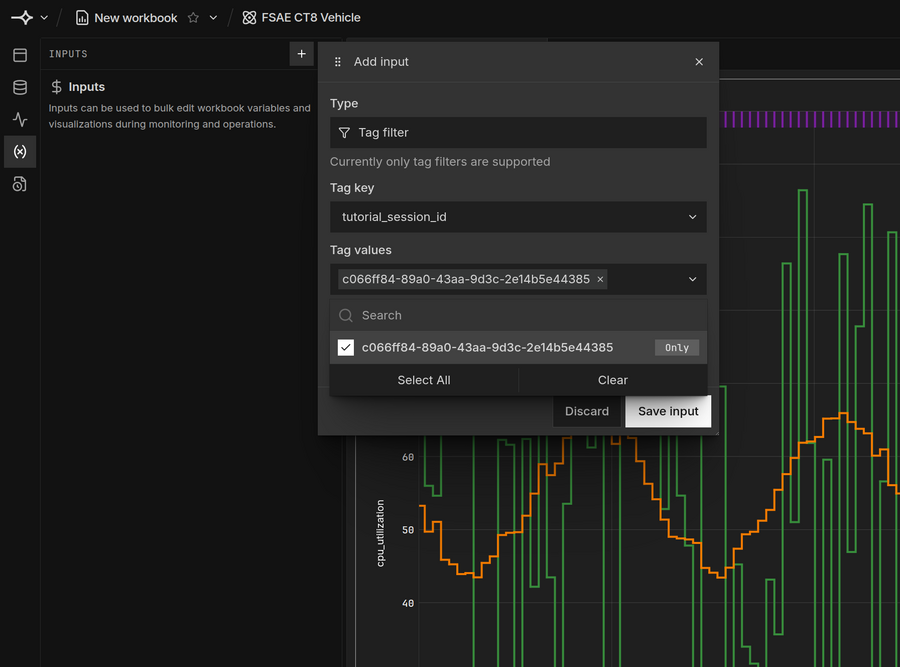
If other people are running this tutorial in your workspace, show only your points with a tag filter:
In the workbook’s Inputs panel, click + and set Type to Tag filter.
Set Tag key to
tutorial_session_id, paste your session ID into Tag values and click Save input.For channels you add later, click + next to the input and select Apply to all variables.
Press Ctrl+C to stop streaming.
Clean up#
Archive the asset from its options menu on the Assets page, or from Python:
client.get_asset("<ASSET_RID>").archive()
Archiving hides the asset without deleting its data. Only a workspace admin can delete the dataset.
To query the data with SQL, see the SQL interface.