Bench bring-up with instro#
Check each instrument’s data as you connect a bench
Requirements: a default profile
for the Nominal Python Client, and the packages the notebook imports, including
instro. Running the notebooks explains how to set them
up.
The bench#
Bench 7 is a new test bench for a power-conversion board, the device under test (DUT). The DUT converts 12 V to 5 V. Before the bench can test DUTs, you bring it up: you connect each instrument, and make sure that its data is correct.
The power supply’s output 1 gives the DUT its 12 V input. Output 2 gives 5 V to the fixture, the board that holds the DUT.
The DMM measures the fixture’s 5 V rail.
The electronic load draws 1 A from the DUT’s 5 V output, and measures the voltage and current there.
Each instrument connects to the bench PC. On the PC, instro reads each instrument and streams its data to Nominal. Each instrument box shows the instrument’s instro name.
        block-beta
  columns 6
  block:shelf:3
    columns 3
    dmm["DMM<br><code>dut_dmm</code>"] psu["Power supply<br><code>bench_psu</code>"] load["Electronic load<br><code>dut_load</code>"]
  end
  space:2
  pc["💻 Bench PC<br>instro"]
  space:6
  block:fixture:3
    columns 3
    rail["Fixture<br>5 V rail"] space dut["DUT"]
  end
  space:2
  nominal[("Nominal")]
  dmm -- "leads" --> rail
  psu -- "5 V" --> rail
  psu -- "12 V" --> dut
  dut -- "5 V, 1 A" --> load
  shelf -- "USB / LAN" --> pc
  pc -- "stream" --> nominal
On a real bench, each instrument uses the instro driver for its model, with the instrument’s VISA address. For example, for a Keysight 34461A DMM on the network:
from instro.drivers import Keysight34461A

dmm_hardware = Keysight34461A("TCPIP::192.168.1.20::INSTR")
instro has drivers for power supplies, DMMs, electronic loads, oscilloscopes and other instruments from many vendors. The instro documentation lists them. This notebook uses instro’s virtual drivers, which simulate the instruments, so it needs no hardware. Only the driver changes on a real bench; the rest of the code stays the same.
The virtual instruments aren’t wired together, so you set what each one measures:
from instro import MeasurementFunction
from instro.drivers import VirtualDMM, VirtualELoad, VirtualPSU

# The DUT draws 0.5 A from 12 V (24 ohm), and the fixture 0.5 A from 5 V (10 ohm).
psu_hardware = VirtualPSU(num_channels=2, load_resistance={1: 24.0, 2: 10.0})
# The DMM's leads are on the wrong output of the power supply, so it measures 12 V.
dmm_hardware = VirtualDMM({MeasurementFunction.DC_VOLTAGE: 12.0})
# The DUT's 5 V output, which drops a little as the load draws current.
eload_hardware = VirtualELoad(source_voltage=5.0, source_resistance=0.05)
Connect the bench to Nominal#
In Nominal, an asset represents a physical system: here, bench 7. Every instrument streams to the
asset’s bench dataset. A run marks a period of time on the asset: here, the bring-up session. To
watch the data arrive during bring-up, open the run in Nominal with Open in Nominal on its card, shown below.
import pandas as pd
from nominal.core import NominalClient, set_display_options

# Show readable timestamps on Nominal's cards.
set_display_options(time_format="readable")

client = NominalClient.from_profile("default")
bench = client.get_or_create_asset_by_properties(
    {"bench_id": "bench-7", "example": "bench_bringup"}, name="Bench 7"
)
dataset = bench.get_or_create_dataset("bench", name="Bench 7 instruments")
# end=None leaves the run open until the session ends.
run = bench.create_run(
    "Bench 7 bring-up", start=pd.Timestamp.now(tz="UTC").floor("s"), end=None
)
run
Run(rid='ri.scout.cerulean-staging.run.38b3cbf7-d469-d6ac-04cc-316a4aa22f39', name='Bench 7 bring-up', description='', properties=mappingproxy({}), labels=(), links=(), start=1793992319000000000, end=None, run_number=473, assets=('ri.scout.cerulean-staging.asset.cb545fdc-997d-d062-bbc0-c84979601495',), created_at=1793992319242619000, is_archived=False)Connect the instruments#
An instro instrument wraps a driver. open() connects to the
instrument, and start() starts a background daemon which reads the
instrument at a fixed interval. It sends each reading to the
instrument’s list of publishers; e.g., a NominalCorePublisher
streams the readings to a Nominal dataset. instro names each channel
<instrument name>.<channel>. The instrument’s card in the notebook
shows its latest readings.
The setup below includes a few typical mistakes that are easy to make on a new bench. In the next section, we’ll perform a few checks that will find them.
The power supply#
import time

from instro import InstroDMM, InstroELoad, InstroPSU, LoadMode
from instro.lib import BackgroundDaemonConfig, NominalCorePublisher
from instro.lib import set_display_options as set_instro_display_options

# Show readable timestamps on instro's cards.
set_instro_display_options(time_format="readable")

psu = InstroPSU(
    name="bench_psu",
    driver=psu_hardware,
    num_channels=2,
    # Stream every reading to the bench's dataset.
    publishers=[NominalCorePublisher(dataset=dataset)],
    # Read both outputs every 100 ms.
    background_config=BackgroundDaemonConfig(interval=0.1),
)
psu.open()
# Set each output's voltage and current limit, and turn the output on.
psu.apply(current_limit=1.0, voltage=12.0, enable=True, channel=1)
psu.apply(current_limit=1.0, voltage=5.0, enable=True, channel=2)
psu.start()
# The card shows the rate of each channel over the last 5 s.
time.sleep(5)
psu
InstroPSU(name='bench_psu', driver=VirtualPSU, publishers=[NominalCorePublisher, DequeInMemoryPublisher], background_running=True)
The power supply measures the voltage, the current, and the enable state of each output. The
channels that end in .cmd are the commands that the code sent, such as the 12 V setpoint
ch1.voltage.cmd. Each instrument also records its daemon’s timing: loop_time is the time
between two reads, and daemon_work_time is the time that one read takes.
The DMM#
dmm = InstroDMM(
    name="dmm",
    driver=dmm_hardware,
    publishers=[NominalCorePublisher(dataset=dataset)],
    background_config=BackgroundDaemonConfig(interval=0.1),
)
dmm.open()
dmm.set_measurement_function(MeasurementFunction.DC_VOLTAGE)
dmm.start()
time.sleep(5)
dmm
InstroDMM(name='dmm', driver=VirtualDMM, publishers=[NominalCorePublisher, DequeInMemoryPublisher], background_running=True)
The DMM measures one value: the DC voltage.
The electronic load#
eload = InstroELoad(name="dut_load", driver=eload_hardware)
eload.open()
# Sink a constant 1 A.
eload.set_mode(LoadMode.CC)
eload.set_level(1.0)
eload.output_enable(True)
eload.start()
time.sleep(5)
eload
InstroELoad(name='dut_load', driver=VirtualELoad, publishers=[DequeInMemoryPublisher], background_running=True)
The electronic load measures the voltage and the current at its input.
Check the bench’s data#
After bring-up, the bench runs a production test on each DUT, by reading channel data from Nominal. Before the bench runs the test, we make sure that each channel that the test reads was published to Nominal, has a value in the expected range, and arrives at the desired rate.
The test spec is where we define these requirements. The test needs 10 Hz data. The lowest rate that the check accepts is 9.5 Hz, because the interval between reads varies a little.
SPEC = {
    "channels": {
        "bench_psu.ch1.voltage": (11.8, 12.2),
        "bench_psu.ch1.current": (0.45, 0.55),
        "bench_psu.ch2.voltage": (4.9, 5.1),
        "bench_psu.ch2.current": (0.45, 0.55),
        "dut_dmm.dc_voltage": (4.9, 5.1),
        "dut_load.ch1.voltage": (4.85, 5.0),
        "dut_load.ch1.current": (0.95, 1.05),
    },
    "min_rate_hz": 9.5,
}
check() is a function, defined below, that we wrote to retrieve the
last 10 s of the bench’s data from Nominal and to compare each channel
with the spec above. It also reports instruments that sends data but
aren’t named in the spec.
from nominal.thirdparty.pandas import datasource_to_dataframe


def check(spec: dict, window_s: float = 10) -> pd.DataFrame:
    """Compare the last ``window_s`` seconds of the bench's data in Nominal with ``spec``."""
    end = pd.Timestamp.now(tz="UTC")
    start = end - pd.Timedelta(seconds=window_s)
    data = datasource_to_dataframe(dataset, start=start, end=end)
    data.index = pd.to_datetime(data.index)

    report = {}
    for channel, (low, high) in spec["channels"].items():
        values = data[channel].dropna() if channel in data else pd.Series()
        if values.empty:
            report[channel] = {"status": "no data"}
            continue
        latest = values.iloc[-1]
        # The rate from the median interval between samples. One sample gives no rate.
        intervals = values.index.diff().dropna()
        rate = 1 / intervals.median().total_seconds() if len(intervals) else 0
        if not low <= latest <= high:
            status = "out of range"
        elif rate < spec["min_rate_hz"]:
            status = "too slow"
        else:
            status = "ok"
        report[channel] = {"latest": latest, "rate (Hz)": rate, "status": status}

    # An instrument that sends data, but that the spec doesn't name.
    named = {channel.split(".")[0] for channel in spec["channels"]}
    sent = data.dropna(axis="columns", how="all")
    sending = {channel.split(".")[0] for channel in sent}
    for instrument in sorted(sending - named):
        report[f"{instrument}.*"] = {"status": "not in spec"}

    report = pd.DataFrame.from_dict(report, orient="index").round(3)
    # Show a value that a row doesn't have as an empty cell.
    return report.astype(object).fillna("")
check(SPEC)
| latest | rate (Hz) | status | |
|---|---|---|---|
| bench_psu.ch1.voltage | 11.975 | 9.982 | ok |
| bench_psu.ch1.current | 0.5 | 9.982 | ok |
| bench_psu.ch2.voltage | 4.996 | 9.983 | ok |
| bench_psu.ch2.current | 0.5 | 9.984 | ok |
| dut_dmm.dc_voltage | no data | ||
| dut_load.ch1.voltage | no data | ||
| dut_load.ch1.current | no data | ||
| dmm.* | not in spec |
The power supply’s channels pass. The check finds two problems:
The DMM’s name is
dmm, so its data arrives asdmm.dc_voltage, anddut_dmm.dc_voltagehas no data.The electronic load’s channels have no data. Its code gives it no publishers, so its card shows only the in-memory buffer, which feeds the card. Nothing ended up published to Nominal.
An instrument’s name is fixed when you create it. To rename the DMM, close it and connect it again
as dut_dmm. You can add a publisher to a running instrument, so give the electronic load a Nominal
publisher without a restart.
dmm.close()
dmm = InstroDMM(
    name="dut_dmm",
    driver=dmm_hardware,
    publishers=[NominalCorePublisher(dataset=dataset)],
    background_config=BackgroundDaemonConfig(interval=0.1),
)
dmm.open()
dmm.set_measurement_function(MeasurementFunction.DC_VOLTAGE)
dmm.start()

eload.add_publisher(NominalCorePublisher(dataset=dataset))

# Wait until the window holds only data from after the changes.
time.sleep(15)
check(SPEC)
| latest | rate (Hz) | status | |
|---|---|---|---|
| bench_psu.ch1.voltage | 12.008 | 9.98 | ok |
| bench_psu.ch1.current | 0.499 | 9.98 | ok |
| bench_psu.ch2.voltage | 4.999 | 9.983 | ok |
| bench_psu.ch2.current | 0.5 | 9.986 | ok |
| dut_dmm.dc_voltage | 12.007 | 9.978 | out of range |
| dut_load.ch1.voltage | 4.951 | 1.0 | too slow |
| dut_load.ch1.current | 1.0 | 1.0 | too slow |
The DMM and the electronic load now send their data to Nominal. The check finds two more problems:
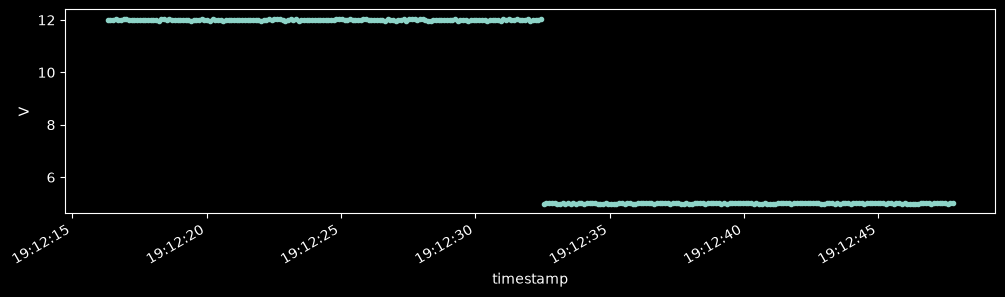
dut_dmm.dc_voltageis 12 V, where the spec expects the 5 V rail. The DMM’s leads are on the power supply’s 12 V output.The electronic load’s channels are too slow. Its code gives no
background_config, so instro reads it at the default interval of 1 s. Its card shows Background as every 1 s.
Move the DMM’s leads to the 5 V rail, and make the daemon read the electronic load every 100 ms:
# In the simulation, moving the leads changes the voltage that the virtual DMM reads.
dmm_hardware.stimulus[MeasurementFunction.DC_VOLTAGE] = 5.0
eload.background_interval = 0.1

time.sleep(15)
check(SPEC)
| latest | rate (Hz) | status | |
|---|---|---|---|
| bench_psu.ch1.voltage | 11.979 | 9.982 | ok |
| bench_psu.ch1.current | 0.5 | 9.982 | ok |
| bench_psu.ch2.voltage | 5.004 | 9.981 | ok |
| bench_psu.ch2.current | 0.5 | 9.982 | ok |
| dut_dmm.dc_voltage | 5.018 | 9.985 | ok |
| dut_load.ch1.voltage | 4.946 | 9.981 | ok |
| dut_load.ch1.current | 1.001 | 9.981 | ok |
Every channel in the spec passes the check.
End the session#
Asset(rid='ri.scout.cerulean-staging.asset.cb545fdc-997d-d062-bbc0-c84979601495', name='Bench 7', description='Power-conversion test bench', properties=mappingproxy({'example': 'bench_bringup', 'bench_id': 'bench-7'}), labels=('bench',), created_at=1793820135019024000, is_archived=False)The bench’s card shows its run and its dataset. Over the run, the DMM steps from 12 V to 5 V when its leads move:
import matplotlib.pyplot as plt

plt.style.use("dark_background")

session = datasource_to_dataframe(
    dataset,
    channels=[dataset.get_channel("dut_dmm.dc_voltage")],
    start=run.start,
    end=run.end,
)
session.index = pd.to_datetime(session.index)
session.plot(style=".", figsize=(12, 3), ylabel="V", legend=False);